
.loc.Introduction to Pandas Loc
In this post, I describe how Pandas loc (.loc) can be used for advanced indexing. We start by reviewing basic indexing and slicing in Pandas. We then dive into .loc, and explore how this indexing attribute can be used to select and filter data in your DataFrames. Along the way, I provide simple and complex examples to help you understand how Pandas loc works, and discuss common gotchas to watch out for. By the end, you'll have a solid understanding of how to use Pandas loc to access data. I will cover Pandas iloc (.iloc) in a future article.
This is the third piece in our Professional Pandas series on teaching best practices about writing professional-grade Pandas code. If you have questions or topics that you would like to dive into, please reach out on Twitter to @ponderdata or @__mharrison__, and if you’d like to see the notebook version of this blogpost, you can find it on Github here.
The Data for Our Examples
For our examples, we will use Los Angeles crime data.
See below for descriptions of the relevant columns, taken directly from the data producer’s data dictionary:
-
DR_NO (Plain Text) Division of Records Number: Official file number made up of a 2 digit year, area ID, and 5 digits
-
Date Rptd (Date & Time) - MM/DD/YYYY
-
DATE OCC (Date & Time) - MM/DD/YYYY
-
TIME OCC (Plain Text) - In 24 hour military time.
-
AREA NAME (Plain Text) - The 21 Geographic Areas or Patrol Divisions are also given a name designation that references a landmark or the surrounding community that it is responsible for. For example 77th Street Division is located at the intersection of South Broadway and 77th Street, serving neighborhoods in South Los Angeles.
-
Crm Cd (Plain Text) - Indicates the crime committed. (Same as Crime Code 1)
-
Crm Cd Desc (Plain Text) - Defines the Crime Code provided.
-
Mocodes (Plain Text) - Modus Operandi: Activities associated with the suspect in commission of the crime. See attached PDF for the list of MO Codes in numerical order.
-
Vict Age (Plain Text) - Two character numeric
-
Vict Sex (Plain Text) - F - Female M - Male X - Unknown
-
Vict Descent (Plain Text) - Descent Code: A - Other Asian B - Black C - Chinese D - Cambodian F - Filipino G - Guamanian H - Hispanic/Latin/Mexican I - American Indian/Alaskan Native J - Japanese K - Korean L - Laotian O - Other P - Pacific Islander S - Samoan U - Hawaiian V - Vietnamese W - White X - Unknown Z - Asian Indian
-
Premis Cd (Number) - The type of structure, vehicle, or location where the crime took place.
-
Premis Desc (Plain Text) - Defines the Premise Code provided.
-
Weapon Used Cd (Plain Text) - The type of weapon used in the crime.
-
Weapon Desc (Plain Text) - Defines the Weapon Used Code provided.
-
Status (Plain Text) - Status of the case. (IC is the default)
-
Status Desc (Plain Text) - Defines the Status Code provided.
-
Crm Cd 1 (Plain Text) - Indicates the crime committed. Crime Code 1 is the primary and most serious one. Crime Code 2, 3, and 4 are respectively less serious offenses. Lower crime class numbers are more serious.
-
LOCATION (Plain Text) - Street address of crime incident rounded to the nearest hundred block to maintain anonymity.
-
Cross Street (Plain Text) - Cross Street of rounded Address
-
LAT (Number) - Latitude
-
LON (Number) - Longtitude
Let’s load the data.
import pandas as pd
url = "https://data.lacity.org/api/views/2nrs-mtv8/rows.csv?accessType=DOWNLOAD"
df = pd.read_csv(url)
The Basics on Indexing and Slicing with Pandas
Before we dive into .loc, it's important to review some basic indexing and slicing in Pandas. In Pandas, a DataFrame is a two-dimensional size-mutable tabular data structure with rows and columns. You can think of it like a spreadsheet or an Excel sheet.
To access a specific column in a DataFrame, you can use square brackets (e.g. df[col]). This is called index access and will return a series in Pandas. Let's get the Crime Description column.
>>> df['Crm Cd Desc']
0   BATTERY - SIMPLE ASSAULT
1   BATTERY - SIMPLE ASSAULT
2   SEX OFFENDER REGISTRANT OUT OF COMPLIANCE
3   VANDALISM - MISDEAMEANOR ($399 OR UNDER)
4   VANDALISM - FELONY ($400 & OVER, ALL CHURCH VA...
    ...
632385  THEFT OF IDENTITY
632386  THEFT FROM MOTOR VEHICLE - GRAND ($950.01 AND ...
632387  VEHICLE - STOLEN
632388  VEHICLE - STOLEN
632389  THEFT FROM MOTOR VEHICLE - GRAND ($950.01 AND ...
Name: Crm Cd Desc, Length: 632390, dtype: object
Note that we can also access a single column by attribute access IF the column has a valid Python attribute name. Meaning that the column must start with an alphabetic character or underscore and the rest of the name must be alphanumerics or underscores. Because Crm Cd Desc has spaces, we will get an error when we try to access it:
>>> df.Crm Cd Desc
  File "", line 1
    df.Crm Cd Desc
           ^
SyntaxError: invalid syntax
However, we can access the AREA column this way:
>>> df.AREA
0          3
1          1
2          1
3         15
4         19
          ..
632385     3
632386    10
632387    10
632388    11
632389    16
Name: AREA, Length: 632390, dtype: int64
Note that I generally try to have attribute-friendly column names or update them if they are not. Most code editing environments for Python have better completion on attribute access, and for that reason I tend to use it.
We can also pull out multiple columns if we pass in a list of column names instead of a scalar. This returns a dataframe.
>>> df[['DATE OCC', 'AREA', 'Vict Age']]
        DATE OCC                  AREA    Vict Age
0       01/08/2020 12:00:00 AM    3       36
1       01/01/2020 12:00:00 AM    1       25
2       02/13/2020 12:00:00 AM    1       0
3       01/01/2020 12:00:00 AM    15      76
4       01/01/2020 12:00:00 AM    19      31
...     ...                       ...     ...
632385  08/02/2022 12:00:00 AM    3       34
632386  12/01/2022 12:00:00 AM    10      68
632387  02/09/2022 12:00:00 AM    10      0
632388  02/08/2022 12:00:00 AM    11      0
632389  02/14/2022 12:00:00 AM    16      61
632390 rows × 3 columns
What Is Pandas Loc, and What Inputs Does it Accept?
Pulling out a subset of columns is fine, but you might also want a subset of rows. Neither index access nor attribute access will give you that. However, the focus of this article, Pandas loc (and .iloc in future articles), allows you to pull out columns and rows.
Here is the key thing to remember about Pandas loc, and if you remember anything from this article, remember this: .loc allows you to pull out rows and columns by label name.
What even is .loc? It is a property. A property could be a post of its own, but in short, it allows you to call a method without parameters (or parentheses). When you say df.loc, pandas is actually running the .loc method and returning the result of it (which is a _LocIndexer).
How do I know all of this? Well, I looked at the source code for Pandas. (This is really easy in Jupyter, just type df.loc?? and run the code. Jupyter will pull up the source code when you put ?? after your code.)
It being a property is not particularly interesting. Perhaps the more interesting part is the docstring which describes how you can index off of the property.
What the Loc Documentation Says About Allowed Inputs
Allowed inputs are:
A single label, e.g. 5 or 'a', (note that 5 is interpreted as a label of the index, and never as an integer position along the index).
A list or array of labels, e.g. ['a', 'b', 'c'].
A slice object with labels, e.g. 'a':'f'.
warning:: Note that contrary to usual python slices, both the start and the stop are included
A boolean array of the same length as the axis being sliced, e.g. [True, False, True].
An alignable boolean Series. The index of the key will be aligned before masking.
An alignable Index. The Index of the returned selection will be the input.
A callable function with one argument (the calling Series or DataFrame) and that returns valid output for indexing (one of the above)
One more thing to be aware of that the docs don’t make clear. (This is also confusing because this is completely different from how indexing normally occurs in Python.) The inputs to the index include both a row indexer and an optional column indexer. You separate these by a comma. Keep that in mind through the following examples.
How to Use Pandas Loc with Each Input Type
Now I will walk you through how to use Pandas loc with each of the above input types, and will turn to the crime data as real-world example data. Note that this data has the default index, the RangeIndex, which is a monotonic increasing integer value.
Part 1: Using Pandas Loc to Index with Scalars
In this case, we will select the row with label 5. (Note that I highlighted label, because remember Pandas loc indexes by label and not by index! Even though in this example the index labels also happen to be the same as the index position.) The integer 5 inside the square brackets is used to select the row with label 5 in the DataFrame.
The syntax for indexing with .loc is df.loc[row_indexer, column_indexer]. In this case, row_indexer is the label 5, and column_indexer is not specified, so all columns are selected.
Here is the code:
>>> df.loc[5]
DR_NO       200100501
Date Rptd   01/02/2020 12:00:00 AM
DATE OCC    01/01/2020 12:00:00 AM
TIME OCC    30
AREA        1
AREA NAME   Central
Rpt Dist No 163
Part 1-2    1
Crm Cd      121
Crm Cd Desc RAPE, FORCIBLE
Mocodes     0413 1822 1262 1415
Vict Age    25
Vict Sex    F
Vict Descent    H
Premis Cd   735.0
Premis Desc NIGHT CLUB (OPEN EVENINGS ONLY)
Weapon Used Cd  500.0
Weapon Desc UNKNOWN WEAPON/OTHER WEAPON
Status      IC
Status Desc Invest Cont
Crm Cd 1    121.0
Crm Cd 2    998.0
Crm Cd 3    NaN
Crm Cd 4    NaN
LOCATION    700 S  BROADWAY
Cross Street    NaN
LAT     34.0452
LON     -118.2534
Name: 5, dtype: object
This might not look like a row. However, because we asked for a single index value, it gave us a row and used a Series to represent it.
One thing to be aware of is that if the row with label 5 does not exist in the DataFrame, this code will raise a KeyError. In this example, we try to pull out a row with the non-existent label of Crm Cd 1.
>>> df.loc['Crm Cd 1']
---------------------------------------------------------------------------
KeyError                                  Traceback (most recent call last)
 in
----> 1 df.loc['Crm Cd 1']
/usr/local/lib/python3.8/dist-packages/pandas/core/indexing.py in __getitem__(self, key)
    929
    930             maybe_callable = com.apply_if_callable(key, self.obj)
--> 931             return self._getitem_axis(maybe_callable, axis=axis)
    932
    933     def _is_scalar_access(self, key: tuple):
/usr/local/lib/python3.8/dist-packages/pandas/core/indexing.py in _getitem_axis(self, key, axis)
   1162         # fall thru to straight lookup
   1163         self._validate_key(key, axis)
-> 1164         return self._get_label(key, axis=axis)
   1165
   1166     def _get_slice_axis(self, slice_obj: slice, axis: int):
/usr/local/lib/python3.8/dist-packages/pandas/core/indexing.py in _get_label(self, label, axis)
   1111     def _get_label(self, label, axis: int):
   1112         # GH#5667 this will fail if the label is not present in the axis.
-> 1113         return self.obj.xs(label, axis=axis)
   1114
   1115     def _handle_lowerdim_multi_index_axis0(self, tup: tuple):
/usr/local/lib/python3.8/dist-packages/pandas/core/generic.py in xs(self, key, axis, level, drop_level)
   3774                 raise TypeError(f"Expected label or tuple of labels, got {key}") from e
   3775         else:
-> 3776             loc = index.get_loc(key)
   3777
   3778             if isinstance(loc, np.ndarray):
/usr/local/lib/python3.8/dist-packages/pandas/core/indexes/range.py in get_loc(self, key, method, tolerance)
    386                 except ValueError as err:
    387                     raise KeyError(key) from err
--> 388             raise KeyError(key)
    389         return super().get_loc(key, method=method, tolerance=tolerance)
    390
KeyError: 'Crm Cd 1'
In the next example we will select a single column. In this case, row_indexer is a slice with a start and end index of :, which selects all rows, and column_indexer is the label ‘Crm Cd 1’, which selects the column with that label.
Here is the full code:
>>> df.loc[:, 'Crm Cd 1']
0         624.0
1         624.0
2         845.0
3         745.0
4         740.0
          ...
632385    354.0
632386    331.0
632387    510.0
632388    510.0
632389    331.0
Name: Crm Cd 1, Length: 632390, dtype: float64
Notice that the row selector for the example was a single colon, :. This syntax might seem weird, but it is actually a slice. You could rewrite this slice as 0:len(df), indicating to take all of rows.
Part 2: Using Pandas Loc to Index with Lists
In our next example, the row_indexer is a list of labels [0,1,2], which selects the rows with those labels, and column_indexer is not specified, so all columns are selected.
Here is the full code:
>>> df.loc[[0,1,2]]
    DR_NO       Date Rptd       DATE OCC        TIME OCC    AREA    AREA NAME   Rpt Dist No Part 1-2    Crm Cd  Crm Cd Desc                 ... Status  Status Desc Crm Cd 1    Crm Cd 2    Crm Cd 3    Crm Cd 4    LOCATION    Cross Street    LAT     LON
0   10304468    01/08/2020 12:00:00 AM  01/08/2020 12:00:00 AM  2230        3   Southwest   377     2       624 BATTERY - SIMPLE ASSAULT            ... AO  Adult Other 624.0       NaN     NaN     NaN     1100 W 39TH PL  NaN     34.0141     -118.2978
1   190101086   01/02/2020 12:00:00 AM  01/01/2020 12:00:00 AM  330     1   Central     163     2       624 BATTERY - SIMPLE ASSAULT            ... IC  Invest Cont 624.0       NaN     NaN     NaN     700 S HILL ST   NaN     34.0459     -118.2545
2   200110444   04/14/2020 12:00:00 AM  02/13/2020 12:00:00 AM  1200        1   Central     155     2       845 SEX OFFENDER REGISTRANT OUT OF COMPLIANCE   ... AA  Adult Arrest    845.0       NaN     NaN     NaN     200 E 6TH ST    NaN     34.0448     -118.2474
3 rows × 28 columns
In this next example, we will return all of the rows and two columns, AREA and TIME OCC.
>>> df.loc[:, ['AREA', 'TIME OCC']]
    AREA    TIME OCC
0   3   2230
1   1   330
2   1   1200
3   15  1730
4   19  415
... ... ...
632385  3   10
632386  10  1800
632387  10  1530
632388  11  2000
632389  16  1800
632390 rows × 2 columns
Now let’s combine using a list of row labels and column labels:
>>> df.loc[[0,1,2], ['AREA', 'TIME OCC']]
        AREA    TIME OCC
0   3   2230
1   1   330
2   1   1200
Part 3: Using Pandas Loc to Index with Slices
Now we will dive more into passing slices into row and column selectors. Again, this example is passing in two slices separated by the comma.
In this case, the syntax df.loc[0:2, 'TIME OCC':'Part 1-2'] is used to select the rows with labels 0, 1, and 2, and the columns with labels from 'TIME OCC' to 'Part 1-2', inclusive, in the DataFrame.
>>> df.loc[0:2, 'TIME OCC':'Part 1-2']
    TIME OCC    AREA    AREA NAME   Rpt Dist No Part 1-2
0   2230        3   Southwest   377     2
1   330     1   Central         163     2
2   1200        1   Central         155     2
One gotcha to be aware of is that slicing with Pandas loc is inclusive. It includes the stop value. Normal Python doesn't behave this way. If I slice a string with 0:2, it uses the half-open interval, returning values from index 0 up to but not including 2.
>>> 'hello'[0:2]
'he'
You can also pass in Python lists with boolean values for the index and column selectors. These lists need to be the same size as the index and columns respectively. In practice, I don’t find that I use this option too often, but for completeness I will show it here.
One place where this is useful is if you have a bunch of columns that have the same prefix/suffix/substring. For example, this dataset has a bunch of columns with Crm in them. This example pulls out every third row and selects only the columns that have a 'Crm' in the them.
>>> df.loc[[True if i%3 == 2 else False for i in range(len(df))],
...        [True if 'Crm' in col else False for col in df.columns]]
    Crm Cd  Crm Cd Desc                     Crm Cd 1    Crm Cd 2    Crm Cd 3    Crm Cd 4
2   845 SEX OFFENDER REGISTRANT OUT OF COMPLIANCE       845.0       NaN     NaN     NaN
5   121 RAPE, FORCIBLE                      121.0       998.0       NaN     NaN
8   341 THEFT-GRAND ($950.01 & OVER)EXCPT,GUNS,FOWL,LI...   341.0       998.0       NaN     NaN
11  930 CRIMINAL THREATS - NO WEAPON DISPLAYED          930.0       NaN     NaN     NaN
14  442 SHOPLIFTING - PETTY THEFT ($950 & UNDER)        442.0       NaN     NaN     NaN
... ... ...                         ...     ...     ...     ...
632375  510 VEHICLE - STOLEN                    510.0       NaN     NaN     NaN
632378  341 THEFT-GRAND ($950.01 & OVER)EXCPT,GUNS,FOWL,LI...   341.0       NaN     NaN     NaN
632381  310 BURGLARY                        310.0       998.0       NaN     NaN
632384  626 INTIMATE PARTNER - SIMPLE ASSAULT           626.0       NaN     NaN     NaN
632387  510 VEHICLE - STOLEN                    510.0       NaN     NaN     NaN
210796 rows × 6 columns
I would probably just write the list comprehension for the column selector in the previous example as:
[col for col in df.columns if 'Crm' in col]
Part 4: Using Pandas Loc to Index with Boolean Arrays
In this next example we pass in what the docs call an alignable boolean Series. Often this is called a boolean array in the real world (which comes from NumPy). In the Pandas context, a boolean array is a series with true/false values that has the same index as another dataframe or series.
In this example, row_indexer is a boolean array created by comparing the values in the AREA NAME column to the string 'Central' using the == operator. Only the rows where the value is True are selected. The column_indexer is not specified, so all columns are selected.
>>> df['AREA NAME'] == 'Central' # boolean array
0         False
1          True
2          True
3         False
4         False
          ...
636127    False
636128    False
636129    False
636130    False
636131    False
Name: AREA NAME, Length: 636132, dtype: bool
You can use a boolean array directly in .loc. This should return only the rows from the Central area.
>>> df.loc[df['AREA NAME'] == 'Central']
    DR_NO       Date Rptd       DATE OCC        TIME OCC    AREA    AREA NAME   Rpt Dist No Part 1-2    Crm Cd  Crm Cd Desc                 ... Status  Status Desc Crm Cd 1    Crm Cd 2    Crm Cd 3    Crm Cd 4    LOCATION        Cross Street    LAT LON
1   190101086   01/02/2020 12:00:00 AM  01/01/2020 12:00:00 AM  330     1   Central     163     2       624 BATTERY - SIMPLE ASSAULT            ... IC  Invest Cont 624.0       NaN     NaN     NaN     700 S HILL ST       NaN 34.0459 -118.2545
2   200110444   04/14/2020 12:00:00 AM  02/13/2020 12:00:00 AM  1200        1   Central     155     2       845 SEX OFFENDER REGISTRANT OUT OF COMPLIANCE   ... AA  Adult Arrest    845.0       NaN     NaN     NaN     200 E 6TH ST        NaN     34.0448 -118.2474
5   200100501   01/02/2020 12:00:00 AM  01/01/2020 12:00:00 AM  30      1   Central     163     1       121 RAPE, FORCIBLE                  ... IC  Invest Cont 121.0       998.0       NaN     NaN     700 S BROADWAY      NaN     34.0452 -118.2534
6   200100502   01/02/2020 12:00:00 AM  01/02/2020 12:00:00 AM  1315        1   Central     161     1       442 SHOPLIFTING - PETTY THEFT ($950 & UNDER)    ... IC  Invest Cont 442.0       998.0       NaN     NaN     700 S FIGUEROA ST   NaN     34.0483 -118.2631
7   200100504   01/04/2020 12:00:00 AM  01/04/2020 12:00:00 AM  40      1   Central     155     2       946 OTHER MISCELLANEOUS CRIME           ... IC  Invest Cont 946.0       998.0       NaN     NaN     200 E 6TH ST        NaN     34.0448 -118.2474
... ...     ...         ...         ...     ... ...     ...     ...     ... ...                     ... ... ...     ...     ...     ...     ...     ...         ...     ... ...
632334  220123144   10/24/2022 12:00:00 AM  10/20/2022 12:00:00 AM  1930        1   Central     159     1       330 BURGLARY FROM VEHICLE               ... IC  Invest Cont 330.0       NaN     NaN     NaN     1500 JESSE ST       NaN     34.0362 -118.2325
632336  220112110   05/10/2022 12:00:00 AM  01/10/2022 12:00:00 AM  1150        1   Central     195     2       354 THEFT OF IDENTITY               ... IC  Invest Cont 354.0       NaN     NaN     NaN     100 W 17TH ST       NaN     34.0329 -118.2631
632340  220107479   03/01/2022 12:00:00 AM  02/28/2022 12:00:00 AM  1400        1   Central     129     1       330 BURGLARY FROM VEHICLE               ... IC  Invest Cont 330.0       NaN     NaN     NaN     400 N VIGNES ST     NaN     34.0511 -118.2334
632360  220106541   02/13/2022 12:00:00 AM  02/13/2022 12:00:00 AM  1745        1   Central     145     2       624 BATTERY - SIMPLE ASSAULT            ... AO  Adult Other 624.0       NaN     NaN     NaN     100 E 5TH ST        NaN     34.0471 -118.2474
632361  220118304   08/15/2022 12:00:00 AM  08/14/2022 12:00:00 AM  420     1   Central     195     1       310 BURGLARY                    ... IC  Invest Cont 310.0       NaN     NaN     NaN     1400 S MAIN ST      NaN     34.0351 -118.2614
41748 rows × 28 columns
You can see that rows with index label 3 and 4 are missing because those rows didn’t have crimes in the Central area.
>>> df.loc[[3,4], ['AREA NAME']]
        AREA NAME
3   N Hollywood
4   Mission
We can also use a boolean array (or alignable boolean Series as the docs call it) for the column selector. It is normal to think of a boolean array for the index selector, a True or False value for each row with the same index. What is a boolean array for the column selector?
To use a boolean array for a column selector you would have a Series that had the column names in the index and True or False values.
In this example, we will select all the columns that have more than the median number of unique column entries.
First, let’s calculate the number of unique entries for each column.
>>> df.nunique()
DR_NO       632390
Date Rptd   1091
DATE OCC    1091
TIME OCC    1439
AREA        21
AREA NAME   21
Rpt Dist No 1191
Part 1-2    2
Crm Cd      137
Crm Cd Desc 137
Mocodes     219372
Vict Age    101
Vict Sex    4
Vict Descen 19
Premis Cd   309
Premis Desc 306
Weapon Used Cd  79
Weapon Desc 79
Status      6
Status Desc 6
Crm Cd 1    139
Crm Cd 2    120
Crm Cd 3    35
Crm Cd 4    6
LOCATION    60076
Cross Street    8884
LAT     5363
LON     4953
dtype: int64
Then we will calculate the median of these values.
>>> df.nunique().median()
137.0
The boolean array will be the columns where the number of unique values is greater than 137.
>>> df.nunique() > 137
DR_NO       True
Date Rptd   True
DATE OCC    True
TIME OCC    True
AREA        False
AREA NAME   False
Rpt Dist No True
Part 1-2    False
Crm Cd      False
Crm Cd Desc False
Mocodes     True
Vict Age    False
Vict Sex    False
Vict Descent    False
Premis Cd   True
Premis Desc True
Weapon Used Cd  False
Weapon Desc False
Status      False
Status Desc False
Crm Cd 1    True
Crm Cd 2    False
Crm Cd 3    False
Crm Cd 4    False
LOCATION    True
Cross Street    True
LAT     True
LON     True
dtype: bool
Let's use this boolean array as the column selector. We will use the slice, :, as the row selector to return all of the rows.
>>> df.loc[:, df.nunique() > 137]
    DR_NO       Date Rptd       DATE OCC        TIME OCC    Rpt Dist No Mocodes     Premis Cd   Premis Desc                 Crm Cd 1    LOCATION        Cross Street    LAT LON
0   10304468    01/08/2020 12:00:00 AM  01/08/2020 12:00:00 AM  2230        377     0444 0913   501.0       SINGLE FAMILY DWELLING              624.0       1100 W 39TH PL      NaN     34.0141 -118.2978
1   190101086   01/02/2020 12:00:00 AM  01/01/2020 12:00:00 AM  330     163     0416 1822 1414  102.0       SIDEWALK                    624.0       700 S HILL ST       NaN     34.0459 -118.2545
2   200110444   04/14/2020 12:00:00 AM  02/13/2020 12:00:00 AM  1200        155     1501        726.0       POLICE FACILITY                 845.0       200 E 6TH ST        NaN     34.0448 -118.2474
3   191501505   01/01/2020 12:00:00 AM  01/01/2020 12:00:00 AM  1730        1543        0329 1402   502.0       MULTI-UNIT DWELLING (APARTMENT, DUPLEX, ETC)    745.0       5400 CORTEEN PL     NaN     34.1685 -118.4019
4   191921269   01/01/2020 12:00:00 AM  01/01/2020 12:00:00 AM  415     1998        0329        409.0       BEAUTY SUPPLY STORE             740.0       14400 TITUS ST      NaN     34.2198 -118.4468
... ...     ...         ...         ...     ...     ...     ...     ...                     ...     ...         ...     ... ...
632385  220314584   08/02/2022 12:00:00 AM  08/02/2022 12:00:00 AM  10      334     0100 1822 0922  501.0       SINGLE FAMILY DWELLING              354.0       4300 W 28TH ST      NaN     34.0311 -118.3335
632386  221017286   12/05/2022 12:00:00 AM  12/01/2022 12:00:00 AM  1800        1047        1822 0385   101.0       STREET                      331.0       17200 BURBANK BL    NaN     34.1722 -118.5077
632387  221005507   02/10/2022 12:00:00 AM  02/09/2022 12:00:00 AM  1530        1024        NaN     108.0       PARKING LOT                 510.0       18800 SHERMAN WY    NaN     34.2011 -118.5426
632388  221105477   02/10/2022 12:00:00 AM  02/08/2022 12:00:00 AM  2000        1171        NaN     101.0       STREET                      510.0       4000 FOUNTAIN AV    NaN     34.0958 -118.2787
632389  221605448   02/15/2022 12:00:00 AM  02/14/2022 12:00:00 AM  1800        1613        0385 1300   101.0       STREET                      331.0       12700 VAN NUYS BL   NaN     34.2755 -118.4092
632390 rows × 13 columns
Part 5: Using Pandas Loc to Index with Indexes
Let’s look at using an alignable index for selection. This consists of passing in an Index that has entries that correspond to entries in the dataframe.
>>> df.loc[pd.Index([0,5,100]),
...        pd.Index(['AREA', 'TIME OCC'])]
        AREA    TIME OCC
0   3   2230
5   1   30
100 1   2210
Why would you use this? In the example above it is just more typing that passing in a list to the row and column indexers.
I grepped through a bunch of my Pandas code to look for examples of this. Let me show two.
This first example comes from creating a dataset for machine learning. It creates the X dataset by dropping rows with missing values. To find the corresponding y labels we use the index from X. Note the line .loc[X.index].
url = 'https://raw.githubusercontent.com/vincentarelbundock/Rdatasets/master/csv/DAAG/possum.csv'
possum = pd.read_csv(url, index_col=[0])
X = (possum
     .dropna()
     .assign(ones=1)
     .loc[:,['ones',
             'hdlngth', 'skullw', 'totlngth', 'taill',
             'footlgth', 'earconch', 'eye', 'chest', 'belly']]
    )
y = (possum
     .loc[X.index]
     .age
    )
Here's one more example that combines the .intersection method of an Index to gather financial data where the we had the smallest openings and the largest gains.
>>> import pandas as pd
>>> url = 'https://query1.finance.yahoo.com/v7/finance/download/TSLA?period1=1669852800&period2=1672444800&interval=1d&events=history&includeAdjustedClose=true'
>>> tsla = pd.read_csv(url)
>>> def get_smallest_open_largest_gain(df_):
...     smallest = df_.nsmallest(10, 'Open')
...     largest = df_.nlargest(10, 'Gain')
...     return df_.loc[smallest.index.intersection(largest.index)]

>>> (tsla
...  .astype({"Date": 'datetime64[ns]',
...           "Open":'float',
...           "High":'float',
...           "Low":'float',
...           "Close":'float',
...           "Adj Close":'float',
...           "Volume":'float'})
...  .assign(Gain=lambda df_:df_.Close - df_.Open)
...  .pipe(get_smallest_open_largest_gain)
... )
    Date        Open        High        Low     Close       Adj Close   Volume      Gain
18  2022-12-28  110.349998  116.269997  108.239998  112.709999  112.709999  221070500.0 2.360001
20  2022-12-30  119.949997  124.480003  119.750000  123.180000  123.180000  157304500.0 3.230003
19  2022-12-29  120.389999  123.570000  117.500000  121.820000  121.820000  221923300.0 1.430001
14  2022-12-21  139.339996  141.259995  135.889999  137.570007  137.570007  145417400.0 -1.769989
10  2022-12-15  153.440002  160.929993  153.279999  157.669998  157.669998  122334500.0 4.229996
Part 6: Using Pandas Loc with Functions as Indexers
Now comes the fun part and the brain-bending part: Passing in a function for the selectors. These come in very hand when you are chaining operations and the index has different values (very common with grouping operations).
Here is an example showing passing in a function that just returns a slice to get the labels from 0 through 10. Again, I don’t need to use a function here, but I’m showing it to introduce the concept before completely melting brains.
>>> def first_ten(df):
...   return slice(0,10)

>>> df.loc[first_ten]  # same as df.loc[0:10]
    DR_NO       Date Rptd       DATE OCC        TIME OCC    AREA    AREA NAME   Rpt Dist No Part 1-2    Crm Cd  Crm Cd Desc                     ... Status  Status Desc Crm Cd 1    Crm Cd 2    Crm Cd 3    Crm Cd 4    LOCATION        Cross Street    LAT LON
0   10304468    01/08/2020 12:00:00 AM  01/08/2020 12:00:00 AM  2230        3   Southwest   377     2       624 BATTERY - SIMPLE ASSAULT                ... AO  Adult Other 624.0       NaN     NaN     NaN     1100 W 39TH PL      NaN     34.0141 -118.2978
1   190101086   01/02/2020 12:00:00 AM  01/01/2020 12:00:00 AM  330     1   Central     163     2       624 BATTERY - SIMPLE ASSAULT                ... IC  Invest Cont 624.0       NaN     NaN     NaN     700 S HILL ST       NaN     34.0459 -118.2545
2   200110444   04/14/2020 12:00:00 AM  02/13/2020 12:00:00 AM  1200        1   Central     155     2       845 SEX OFFENDER REGISTRANT OUT OF COMPLIANCE       ... AA  Adult Arrest    845.0       NaN     NaN     NaN     200 E 6TH ST        NaN     34.0448 -118.2474
3   191501505   01/01/2020 12:00:00 AM  01/01/2020 12:00:00 AM  1730        15  N Hollywood 1543        2       745 VANDALISM - MISDEAMEANOR ($399 OR UNDER)        ... IC  Invest Cont 745.0       998.0       NaN     NaN     5400 CORTEEN PL     NaN     34.1685 -118.4019
4   191921269   01/01/2020 12:00:00 AM  01/01/2020 12:00:00 AM  415     19  Mission     1998        2       740 VANDALISM - FELONY ($400 & OVER, ALL CHURCH VA...   ... IC  Invest Cont 740.0       NaN     NaN     NaN     14400 TITUS ST      NaN     34.2198 -118.4468
5   200100501   01/02/2020 12:00:00 AM  01/01/2020 12:00:00 AM  30      1   Central     163     1       121 RAPE, FORCIBLE                      ... IC  Invest Cont 121.0       998.0       NaN     NaN     700 S BROADWAY      NaN     34.0452 -118.2534
6   200100502   01/02/2020 12:00:00 AM  01/02/2020 12:00:00 AM  1315        1   Central     161     1       442 SHOPLIFTING - PETTY THEFT ($950 & UNDER)        ... IC  Invest Cont 442.0       998.0       NaN     NaN     700 S FIGUEROA ST   NaN     34.0483 -118.2631
7   200100504   01/04/2020 12:00:00 AM  01/04/2020 12:00:00 AM  40      1   Central     155     2       946 OTHER MISCELLANEOUS CRIME               ... IC  Invest Cont 946.0       998.0       NaN     NaN     200 E 6TH ST        NaN     34.0448 -118.2474
8   200100507   01/04/2020 12:00:00 AM  01/04/2020 12:00:00 AM  200     1   Central     101     1       341 THEFT-GRAND ($950.01 & OVER)EXCPT,GUNS,FOWL,LI...   ... IC  Invest Cont 341.0       998.0       NaN     NaN     700 BERNARD ST      NaN     34.0677 -118.2398
9   201710201   06/19/2020 12:00:00 AM  05/26/2020 12:00:00 AM  1925        17  Devonshire  1708        1       341 THEFT-GRAND ($950.01 & OVER)EXCPT,GUNS,FOWL,LI...   ... AO  Adult Other 341.0       NaN     NaN     NaN     11900 BALBOA BL     NaN     34.2864 -118.5021
10  200100509   01/04/2020 12:00:00 AM  01/04/2020 12:00:00 AM  2200        1   Central     192     1       330 BURGLARY FROM VEHICLE                   ... IC  Invest Cont 330.0       NaN     NaN     NaN     15TH            OLIVE       34.0359 -118.2648
11 rows × 28 columns
Unless I'm reusing the function in multiple places in my code, I generally will inline it with an anonymous function, a lambda.
This is the same code as above but it uses a lambda.
>>> df.loc[lambda ignore_df: slice(0,10)]
    DR_NO       Date Rptd       DATE OCC        TIME OCC    AREA    AREA NAME   Rpt Dist No Part 1-2    Crm Cd  Crm Cd Desc                     ... Status  Status Desc Crm Cd 1    Crm Cd 2    Crm Cd 3    Crm Cd 4    LOCATION        Cross Street    LAT LON
0   10304468    01/08/2020 12:00:00 AM  01/08/2020 12:00:00 AM  2230        3   Southwest   377     2       624 BATTERY - SIMPLE ASSAULT                ... AO  Adult Other 624.0       NaN     NaN     NaN     1100 W 39TH PL      NaN     34.0141 -118.2978
1   190101086   01/02/2020 12:00:00 AM  01/01/2020 12:00:00 AM  330     1   Central     163     2       624 BATTERY - SIMPLE ASSAULT                ... IC  Invest Cont 624.0       NaN     NaN     NaN     700 S HILL ST       NaN     34.0459 -118.2545
2   200110444   04/14/2020 12:00:00 AM  02/13/2020 12:00:00 AM  1200        1   Central     155     2       845 SEX OFFENDER REGISTRANT OUT OF COMPLIANCE       ... AA  Adult Arrest    845.0       NaN     NaN     NaN     200 E 6TH ST        NaN     34.0448 -118.2474
3   191501505   01/01/2020 12:00:00 AM  01/01/2020 12:00:00 AM  1730        15  N Hollywood 1543        2       745 VANDALISM - MISDEAMEANOR ($399 OR UNDER)        ... IC  Invest Cont 745.0       998.0       NaN     NaN     5400 CORTEEN PL     NaN     34.1685 -118.4019
4   191921269   01/01/2020 12:00:00 AM  01/01/2020 12:00:00 AM  415     19  Mission     1998        2       740 VANDALISM - FELONY ($400 & OVER, ALL CHURCH VA...   ... IC  Invest Cont 740.0       NaN     NaN     NaN     14400 TITUS ST      NaN     34.2198 -118.4468
5   200100501   01/02/2020 12:00:00 AM  01/01/2020 12:00:00 AM  30      1   Central     163     1       121 RAPE, FORCIBLE                      ... IC  Invest Cont 121.0       998.0       NaN     NaN     700 S BROADWAY      NaN     34.0452 -118.2534
6   200100502   01/02/2020 12:00:00 AM  01/02/2020 12:00:00 AM  1315        1   Central     161     1       442 SHOPLIFTING - PETTY THEFT ($950 & UNDER)        ... IC  Invest Cont 442.0       998.0       NaN     NaN     700 S FIGUEROA ST   NaN     34.0483 -118.2631
7   200100504   01/04/2020 12:00:00 AM  01/04/2020 12:00:00 AM  40      1   Central     155     2       946 OTHER MISCELLANEOUS CRIME               ... IC  Invest Cont 946.0       998.0       NaN     NaN     200 E 6TH ST        NaN     34.0448 -118.2474
8   200100507   01/04/2020 12:00:00 AM  01/04/2020 12:00:00 AM  200     1   Central     101     1       341 THEFT-GRAND ($950.01 & OVER)EXCPT,GUNS,FOWL,LI...   ... IC  Invest Cont 341.0       998.0       NaN     NaN     700 BERNARD ST      NaN     34.0677 -118.2398
9   201710201   06/19/2020 12:00:00 AM  05/26/2020 12:00:00 AM  1925        17  Devonshire  1708        1       341 THEFT-GRAND ($950.01 & OVER)EXCPT,GUNS,FOWL,LI...   ... AO  Adult Other 341.0       NaN     NaN     NaN     11900 BALBOA BL     NaN     34.2864 -118.5021
10  200100509   01/04/2020 12:00:00 AM  01/04/2020 12:00:00 AM  2200        1   Central     192     1       330 BURGLARY FROM VEHICLE                   ... IC  Invest Cont 330.0       NaN     NaN     NaN     15TH            OLIVE       34.0359 -118.2648
11 rows × 28 columns
Note that we can also pass in a function to the column selector, in this case we get an error because the columns are strings and the function trys to slice with numbers.
>>> df.loc[:, first_ten]
---------------------------------------------------------------------------
TypeError                                 Traceback (most recent call last)
<ipython-input-34-484bd8722f00> in <module>
----> 1 df.loc[:, first_ten]
/usr/local/lib/python3.8/dist-packages/pandas/core/indexing.py in __getitem__(self, key)
    923                 with suppress(KeyError, IndexError):
    924                     return self.obj._get_value(*key, takeable=self._takeable)
--> 925             return self._getitem_tuple(key)
    926         else:
    927             # we by definition only have the 0th axis
/usr/local/lib/python3.8/dist-packages/pandas/core/indexing.py in _getitem_tuple(self, tup)
   1107             return self._multi_take(tup)
   1108
-> 1109         return self._getitem_tuple_same_dim(tup)
   1110
   1111     def _get_label(self, label, axis: int):
/usr/local/lib/python3.8/dist-packages/pandas/core/indexing.py in _getitem_tuple_same_dim(self, tup)
    804                 continue
    805
--> 806             retval = getattr(retval, self.name)._getitem_axis(key, axis=i)
    807             # We should never have retval.ndim < self.ndim, as that should
    808             #  be handled by the _getitem_lowerdim call above.
/usr/local/lib/python3.8/dist-packages/pandas/core/indexing.py in _getitem_axis(self, key, axis)
   1140         if isinstance(key, slice):
   1141             self._validate_key(key, axis)
-> 1142             return self._get_slice_axis(key, axis=axis)
   1143         elif com.is_bool_indexer(key):
   1144             return self._getbool_axis(key, axis=axis)
/usr/local/lib/python3.8/dist-packages/pandas/core/indexing.py in _get_slice_axis(self, slice_obj, axis)
   1174
   1175         labels = obj._get_axis(axis)
-> 1176         indexer = labels.slice_indexer(slice_obj.start, slice_obj.stop, slice_obj.step)
   1177
   1178         if isinstance(indexer, slice):
/usr/local/lib/python3.8/dist-packages/pandas/core/indexes/base.py in slice_indexer(self, start, end, step, kind)
   5683         slice(1, 3, None)
   5684         """
-> 5685         start_slice, end_slice = self.slice_locs(start, end, step=step)
   5686
   5687         # return a slice
/usr/local/lib/python3.8/dist-packages/pandas/core/indexes/base.py in slice_locs(self, start, end, step, kind)
   5885         start_slice = None
   5886         if start is not None:
-> 5887             start_slice = self.get_slice_bound(start, "left")
   5888         if start_slice is None:
   5889             start_slice = 0
/usr/local/lib/python3.8/dist-packages/pandas/core/indexes/base.py in get_slice_bound(self, label, side, kind)
   5795         # For datetime indices label may be a string that has to be converted
   5796         # to datetime boundary according to its resolution.
-> 5797         label = self._maybe_cast_slice_bound(label, side)
   5798
   5799         # we need to look up the label
/usr/local/lib/python3.8/dist-packages/pandas/core/indexes/base.py in _maybe_cast_slice_bound(self, label, side, kind)
   5747         # reject them, if index does not contain label
   5748         if (is_float(label) or is_integer(label)) and label not in self._values:
-> 5749             raise self._invalid_indexer("slice", label)
   5750
   5751         return label
TypeError: cannot do slice indexing on Index with these indexers [0] of type int
Here is the obligatory example with a function in the column selector.
>>> df.loc[:, lambda adf: slice('TIME OCC','Part 1-2')]
    TIME OCC    AREA    AREA NAME   Rpt Dist No Part 1-2
0   2230        3   Southwest   377     2
1   330     1   Central     163     2
2   1200        1   Central     155     2
3   1730        15  N Hollywood 1543        2
4   415     19  Mission     1998        2
... ...     ... ...     ...     ...
632385  10      3   Southwest   334     2
632386  1800        10  West Valley 1047        1
632387  1530        10  West Valley 1024        1
632388  2000        11  Northeast   1171        1
632389  1800        16  Foothill    1613        1
632390 rows × 5 columns
Here is a more realistic example showing using a function in .loc in a chain of operations. Assume we want to understand how vehicle crimes occur over monthly periods. We could use some code like this.
This code uses several functions and methods from the Pandas library to clean, organize, and summarize data in a DataFrame. First, the .astype method is used to convert the data types of the 'Date Rptd' and 'DATE OCC' columns to 'Datetime64'. Then, the .groupby method is used to group the data by the 'DATE OCC' column and the 'AREA NAME' and 'Crm Cd Desc' columns. The .size method is then used to count the number of rows in each group, and the .unstack method is used to pivot the data so that the 'Crm Cd Desc' values become column labels.
Finally, the .loc indexer is used to select only the columns where the label contains the string 'VEHICLE'. We need to use a function to get the column labels because these columns come from the value of the Crm Cd Desc column. They were not columns in the original data frame.
The a_df parameter for the lambda function is the intermediate state of the data in the chain. It is the result of the .unstack method on the line above it.
I use functions all the time in .loc because I'm a big proponent of chaining your Pandas code to make it easier to understand. (See our article on chaining for more details on chaining.)
>>> (df
...  .astype({'Date Rptd': 'Datetime64',
...           'DATE OCC': 'Datetime64',
...           })
...  .groupby([pd.Grouper(key='DATE OCC', freq='M'), 'AREA NAME', 'Crm Cd Desc'])
...  .size()
...  .unstack()
...  .loc[:,
...       lambda a_df: [col for col in a_df.columns if 'VEHICLE' in col]]
...  )
        Crm Cd Desc BURGLARY FROM VEHICLE   BURGLARY FROM VEHICLE, ATTEMPTED    SHOTS FIRED AT MOVING VEHICLE, TRAIN OR AIRCRAFT    THEFT FROM MOTOR VEHICLE - ATTEMPT  THEFT FROM MOTOR VEHICLE - GRAND ($950.01 AND OVER) THEFT FROM MOTOR VEHICLE - PETTY ($950 & UNDER) THROWING OBJECT AT MOVING VEHICLE   VEHICLE - ATTEMPT STOLEN    VEHICLE - MOTORIZED SCOOTERS, BICYCLES, AND WHEELCHAIRS VEHICLE - STOLEN
DATE OCC    AREA NAME
2020-01-31  77th Street 75.0            NaN                 9.0                         3.0                 17.0                            49.0                        2.0                 4.0             NaN                         123.0
        Central     144.0           NaN                 NaN                         1.0                 16.0                            31.0                        1.0                 NaN             1.0                         45.0
        Devonshire  67.0            NaN                 NaN                         NaN                 20.0                            49.0                        1.0                 3.0             NaN                         40.0
        Foothill    37.0            NaN                 NaN                         NaN                 13.0                            40.0                        NaN                 2.0             NaN                         69.0
        Harbor      29.0            NaN                 NaN                         NaN                 19.0                            40.0                        1.0                 1.0             NaN                         77.0
...     ...     ...         ...                 ...                         ...                 ...                         ...                     ...                 ...             ...                         ...
2020-06-30  Topanga     55.0            2.0                 NaN                         1.0                 25.0                            39.0                        2.0                 NaN             NaN                         74.0
        Van Nuys    81.0            2.0                 NaN                         NaN                 24.0                            45.0                        1.0                 3.0             NaN                         97.0
        West LA     80.0            1.0                 NaN                         NaN                 32.0                            32.0                        NaN                 1.0             2.0                         62.0
        West Valley 51.0            NaN                 NaN                         2.0                 23.0                            37.0                        NaN                 3.0             NaN                         79.0
        Wilshire    50.0            1.0                 NaN                         1.0                 16.0                            37.0                        1.0                 1.0             NaN                         60.0
126 rows × 10 columns
A Practical Example of Pandas Loc
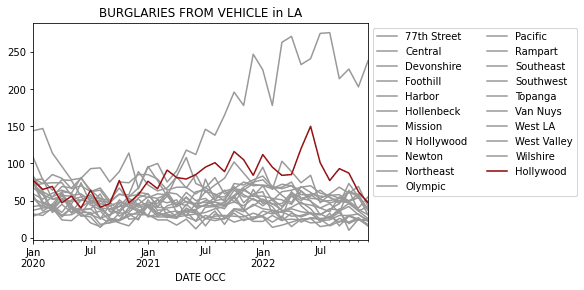
We will wrap up with a visualization of the previous analysis. I will dive into the Burglary from Vehicle column and plot that over time for the different Area Name values.
In this example, in the latter .loc I use a lambda function to move the Hollywood column to the end so that it appears on top of the other columns.
def set_colors(df):
  global colors
  colors = ['#991111' if col == 'Hollywood' else '#999999' for col in df.columns]
  return df

ax = (df
 .astype({'Date Rptd': 'Datetime64',
          'DATE OCC': 'Datetime64',
          })
 .groupby([pd.Grouper(key='DATE OCC', freq='M'), 'AREA NAME', 'Crm Cd Desc'])
 .size()
 .unstack()
 .loc[:, 'BURGLARY FROM VEHICLE']
 .unstack()
 .loc[:, lambda adf: sorted(adf.columns, key=lambda col:1 if col == 'Hollywood' else -1)]
 .pipe(set_colors)
 .plot(color=colors, title='BURGLARIES FROM VEHICLE in LA')
 )
ax.legend(bbox_to_anchor=(1,1), ncol=2)
Using Loc with Modin
In Modin's pandas API, .loc works identically to the original Pandas. As you can imagine, this is tricky in a distributed dataframe system. There were a lot of new problems to solve:
- What machine is a given row label on?
- How do we know if a row is not on any machine and throw an error for the user?
- How do we make this fast?
We solved all three of these by separating the dataframe's data from the Index and storing the Index close to the user for fast lookups with .loc. We maintain an internal mapping from the fast Index to the machine that the row is on. This way we can make the row lookups fast!
Though .loc is fast in Modin, it is not as fast as Pandas because of the extra layer between the data and the Index. Still, the lookup should be within a few milliseconds of Pandas — and still well within the window of fast interactive performance.
Conclusion
Thanks for reading part one of our ultimate guide to indexing in Pandas (and the third article in our Professional Pandas series). In this article we introduced using Pandas loc to select rows and columns. You should have a good understanding of the different inputs that the .loc index accepts.
To practice and further improve your skills, try using .loc on your own datasets and see how you can effectively index and slice your data. Don't forget to also review the common gotchas discussed in this tutorial to avoid any pitfalls when using these indexing attributes.
For more in this series, read the Pandas assign method and chaining and the Pandas merge method.